What is EX.IO’s chat trading?
What is EX.IO’s Chat Trading?
EX.IO Chat Trading enables you to negotiate and execute Over-the-Counter (OTC) trades in real time using our secure, in-app instant messaging tool. Chat directly with our institutional traders, receive tailored real-time quotes, and confirm transactions instantly within the chat window.
What are the requirements to use EX.IO’s Chat Trading?
Anyone with a registered EX.IO account can open the chat tool. However, to negotiate and execute trades, you must meet the following criteria:
- Completed KYC Verification: Your account must be fully verified and in active standing.
- Sufficient Account Balance: You must hold adequate funds in your OTC account to cover and execute the trade.
Note: Trading assets available only for Professional Investor (PI) requires a verified PI status. Learn how to upgrade your account to Professional Investor status.
How do I start chatting to an EX.IO’s OTC Trader?
- Log in to your registered EX.IO account.
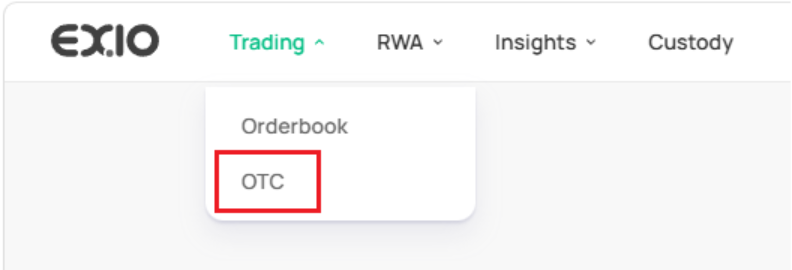
- Hover over Trading in the top navigation menu.
- Select OTC to open the OTC trading dashboard.
Creating a Quote Request
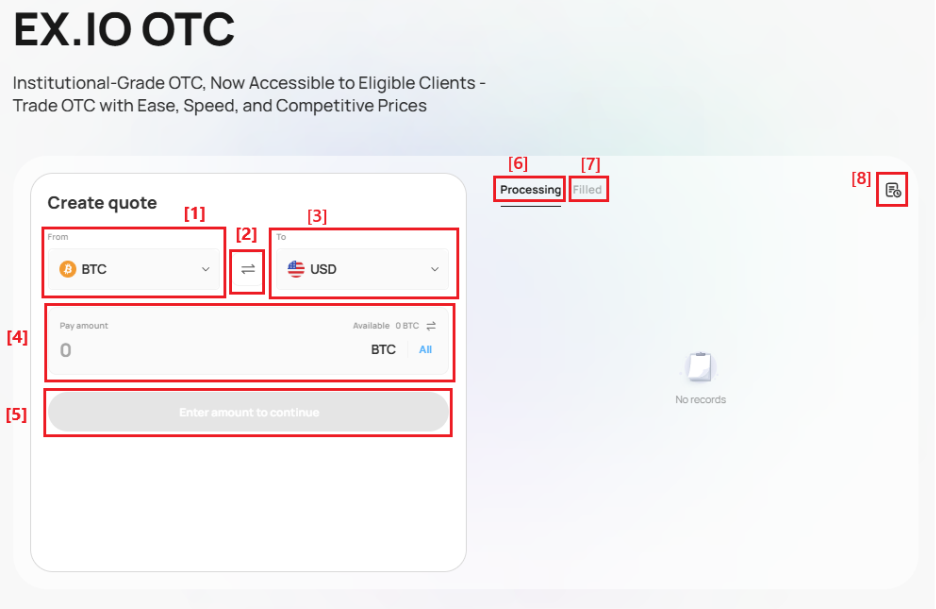
Fill out the quote form on the OTC page:
[1] From: Select the asset you want to trade/sell.
[2] Swap Icon: Click to swap your From and To assets.
[3] To: Select the asset you want to receive in return.
[4] Pay amount: Enter the quantity of the From asset you wish to trade
[5] Action Button: Once all fields are populated, this button will turn green. Click it to launch a live chat with an EX.IO OTC trader.
Tracking Your Trades
[6] Processing: Displays trades currently being processed after the terms have been confirmed with the trader.
[7] Filled: Displays completed orders that have fully settled.
[8] History Page: Click this icon to view your complete history of past trade transactions.
Important Note: Once a trade is confirmed, it is final and cannot be cancelled or modified.